


How to Use the MyBuick Mobile App
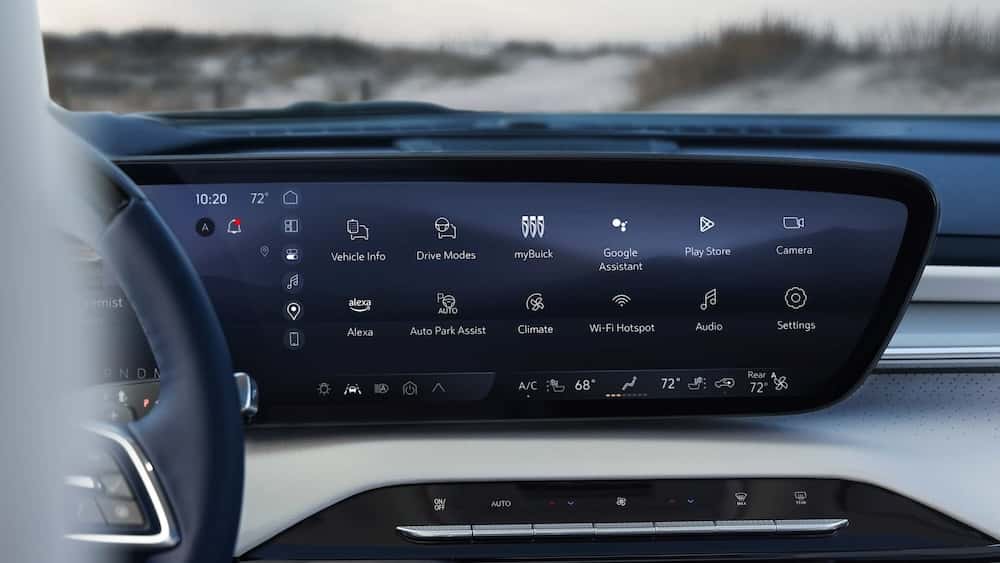
Photo Source/Copyright: Buick
The MyBuick Mobile App allows Buick owners to remotely start their vehicle, lock and unlock doors, check vehicle health, locate their vehicle, schedule service, and access connected services from their smartphone. Finding the right tools to maximize your driving experience is easy with the Mybuick mobile app.
What the MyBuick Mobile App Is
The MyBuick Mobile App is a digital command center designed to seamlessly connect your smartphone to your vehicle. Serving as the ultimate companion for Buick owners, it bridges the gap between your digital life and your driving experience, offering unprecedented control over your vehicle from virtually anywhere.
Key MyBuick Mobile App Features
Remote Start
Never step into a freezing or overheating car again. You can remotely start your engine from the app to pre-set the cabin to your preferred temperature before you even open the door.
Remote Lock & Unlock
Forgot to lock up? You can lock and unlock your doors from anywhere in the world and receive instant, real-time confirmations on your screen.
Vehicle Health Reports
Monitor your vehicle’s vital signs through a comprehensive dashboard. Track tire pressure, oil life, fuel levels, and battery status in real-time, and receive proactive maintenance alerts.
Vehicle Locator
Easily pinpoint your vehicle’s exact location on a map. You can also activate the horn and lights to quickly find your car in a crowded parking lot.
Navigation Tools
Search for destinations on your smartphone and send the directions directly to your Buick’s in-dash navigation system before you start driving.
Security Features
Receive instant notifications if your vehicle’s alarm is triggered. The app also works alongside OnStar to provide stolen vehicle assistance and location tracking.
How the MyBuick Mobile App Works
The app communicates with your vehicle using integrated cellular connectivity and OnStar embedded hardware. When you press a command on your smartphone, the app sends a secure signal through the cloud directly to your Buick, allowing you to interact with your car regardless of the distance between you and the vehicle.
How to Set Up the App
Setting up your digital garage takes just a few quick steps:
- Download the MyBuick Mobile App from the Apple App Store or Google Play Store.
- Log in using your OnStar or Buick Owner Center credentials. If you do not have an account, click “Create Account.”
- Add your vehicle by scanning or manually entering the Vehicle Identification Number (VIN).
- Verify your ownership and follow the on-screen prompts to activate your connected services.
For a seamless setup, the expert team at NYE Buick GMC is always available to provide a hands-on demo and help sync your preferences.
Which Buick Models Support the App
Most modern Buick models equipped with OnStar capability support the app. This includes popular crossovers and SUVs like the Buick Encore, Encore GX, Envision, and Enclave from recent model years. Features may vary slightly based on your specific vehicle trim, model year, and active connected services plan.
More From Nye Buick GMC
How To Pick Your Perfect GMC SUV Model
Photo Credit: GMC When you’re out looking for a solid SUV, the options can get overwhelming fast. At NYE Buick GMC, the showroom floor gives you a clear look at how different drivers—from solo commuters to big families—fit into the GMC lineup. Finding the right vehicle comes down to how much space you…
GMC Terrain Elevation: Great Style and Value
Photo Source/Copyright: GMC What Makes the GMC Terrain Elevation Worth a Look? Buying a compact SUV usually means choosing between plain, uninspired commuters or top-tier trims that push past your target budget. The GMC Terrain Elevation hits a middle ground that makes sense for a lot of drivers. Over at NYE Buick GMC, it’s…
2026 Buick Envista Interior
Photo Source/Copyright: General Motors – Buick The 2026 Buick Envista is a subcompact SUV that proves you don’t have to sacrifice style or comfort for everyday practicality. With its sleek, coupe-inspired profile and sophisticated design, the Envista makes a strong impression on the road. But its appeal goes beyond its exterior. Buick Envista Interior: Feature…